Logitech ERGO K860 review: the first expensive keyboard I do not regret buying
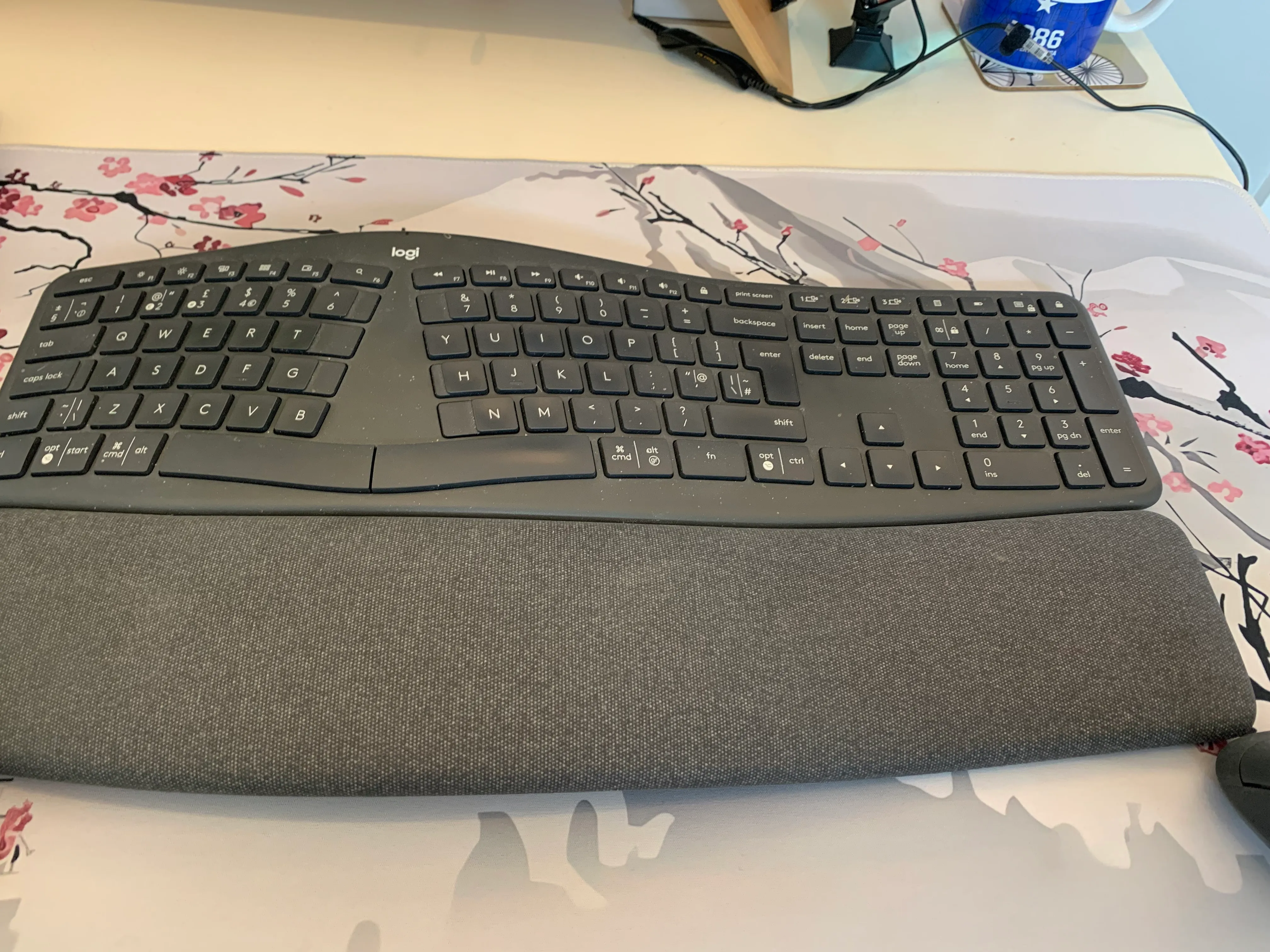
Large, comfortable and initially very strange, the Logitech ERGO K860 took about a week to get used to but has improved my touch typing and made long working days much more comfortable.
Pros
- Large padded wrist rest
- Split layout encourages better touch typing
- Comfortable for larger hands and fingers
- Soft, firm and responsive keys
- Full number pad suitable for frequent data work
- Reliable wireless connection
- Useful keyboard shortcuts
- Good battery life in the author’s experience
Minor drawback
Feels very strange initially and took approximately one week to adapt; it is large and needs reasonable desk space, some shortcut symbols are not immediately obvious, and I regularly press Caps Lock instead of A.
For most of my working life, a keyboard was simply the flat plastic thing that came with the computer.
Before buying the Logitech ERGO K860, I was using a very cheap, standard Logitech keyboard that probably cost around £10. It worked, letters appeared when I pressed the keys, and I had never given much thought to whether a keyboard could do anything more ambitious.
Then I started working from home more regularly and realised I was using a keyboard for at least eight hours a day—and sometimes closer to twelve.
At that point, spending £59.99 on something I use constantly began to seem less extravagant and more like overdue maintenance.
I ordered the Logitech ERGO K860 on 26 November 2025, having chosen it largely because of the reviews. There was no complicated scientific selection process. Other people appeared to like it, it looked as though it might be comfortable, and I decided to take the unusual step of spending proper money on a keyboard.
It feels extremely strange at first
The ERGO K860 is curved, raised and divided into two sections, so it does not feel anything like a conventional keyboard when you first place your hands on it.
For the first few days, typing became a conscious activity rather than something that happened automatically. My fingers had spent years developing their own unofficial working practices, and the split layout suddenly insisted that each hand remain in its designated department.
It took me roughly a week of continuous use before it began to feel natural.
That is worth knowing because this is not necessarily a keyboard you will love during the first ten minutes. There is a brief period where you may wonder whether you have spent nearly £60 to become worse at typing.
Stick with it.
Once my hands adjusted, my touch typing improved noticeably. The separation encourages each hand to use the correct keys, rather than allowing whichever finger happens to be nearby to intervene.
My typing is now faster and more controlled than it was on the standard keyboard.
The wrist rest has made the biggest difference
The large padded wrist rest is probably the most important part of the keyboard.
Before changing to the ERGO K860, my wrists regularly ached after long periods at the computer. Since using it, that aching has stopped.
That is only my personal experience rather than a medical claim, but it is the clearest reason I would not willingly return to a normal flat keyboard.
The wrist rest also felt unusual during the first week. It changes the height and angle of your hands, so some of the initial awkwardness probably came from adjusting to both the split keyboard and the raised resting position at the same time.
It still looks clean and in good condition, even though the keyboard itself could probably benefit from an appointment with a small brush.
The keys feel excellent
The keys are soft but firm, responsive and pleasantly tactile.
You can clearly feel when a key has been pressed, without needing to hit it particularly hard. They are also comfortable when held down, which is useful when repeating a character or moving continuously through a document.
I have experienced no missed keystrokes, connection failures or occasions when the keyboard has decided to take the afternoon off.
It connects through the supplied USB receiver and has worked immediately and reliably every time.
I use it with my personal desktop computer rather than switching it between machines. When using the work laptop, I use the laptop keyboard. I move the mice between computers when necessary, but relocating an ergonomic keyboard of this size would be less “quick device switch” and more “office furniture rearrangement”.
You can see how it fits into my complete dual-computer ergonomic desk setup.
It suits larger hands
The keyboard is large, but for me that is an advantage.
I am a large person with large hands and fingers, and the keys feel well spaced. I am less likely to catch neighbouring keys accidentally than I was on smaller keyboards.
It is slightly wider than my previous standard keyboard and takes up a fair amount of desk space. It is not excessive, especially on my large desk mat, but this is not a compact keyboard designed to disappear neatly beneath a small monitor stand.
It arrives and occupies territory.
Anyone with a very narrow desk should measure the available space before buying one. Anyone with larger hands may regard its size as one of its best features.
The number pad is essential
The ERGO K860 includes a full number pad, which I use constantly.
I am a statistician. Numbers are not a decorative extra occasionally required for entering a postcode. They are the principal occupants of my working day.
A keyboard without a number pad would therefore be about as useful to me as a calculator containing only inspirational quotations.
The number pad is comfortable, sensibly positioned and one of the reasons the keyboard works so well for spreadsheets, reporting and data analysis.
Some of the symbols take time to understand
The keyboard includes plenty of shortcuts and function keys, but not all of their symbols were immediately obvious to me.
Some keys appear to have several possible functions printed on them, and during the first few days I occasionally had to work out which combination produced the symbol or command I wanted.
The key used for familiar Windows functions also did not look quite as I expected, so there was another small period of learning what each symbol meant.
Once understood, the shortcuts are useful. Locking the computer, controlling common functions and accessing frequently used commands is straightforward.
It is not difficult; it simply assumes that you are prepared to learn a few hieroglyphics.
My ongoing battle with Caps Lock
The only key I still press incorrectly is Caps Lock.
For some reason, my left little finger repeatedly chooses Caps Lock instead of the letter A.
Nothing else causes a problem. I do not catch neighbouring letters, miss keys or press the wrong section of the keyboard. It is specifically Caps Lock, which means my typing occasionally becomes unexpectedly forceful.
I CAN BE WRITING A PERFECTLY NORMAL SENTENCE AND THEN APPEAR TO HAVE BECOME FURIOUS HALFWAY THROUGH IT.
This is becoming less frequent, but it has not disappeared entirely.
I suspect the keyboard is no longer responsible. My finger has simply selected an enemy.
Battery life and reliability
Since November 2025, I have changed the batteries once.
I cannot remember the exact date, but it was probably around six to eight weeks ago. Given that the keyboard is used for at least eight hours on most working days, and often considerably longer, I have no complaints about the battery life.
It connects first time, remains connected and is always ready to use.
That reliability matters more than an impressive list of features. The best office equipment is the equipment you stop thinking about because it works whenever required.
Was it worth £59.99?
Yes.
This was the first time I had spent a meaningful amount of money on a keyboard, and I do not regret it.
It feels better, suits my hands, has improved my touch typing and has made long days at the computer more comfortable. Considering how many hours I use it, £59.99 no longer seems particularly extravagant.
I have spent more money on things I have used twice and then stored in a cupboard while pretending they remain part of an active plan.
This keyboard is used every day.
Would I buy it again?
Yes, although I would still check what else was available at the time.
Technology changes, new keyboards appear, and it is entirely possible that by the time this one eventually needs replacing, voice dictation will have improved enough that I can simply talk at the computer all day.
This is a prospect that should concern both the computer and everybody in adjoining rooms.
I would not automatically reorder without looking around, but another ERGO K860 would be the standard every alternative had to beat.
Verdict
The Logitech ERGO K860 initially feels strange and requires several days of genuine adjustment. It is also large, occupies a significant amount of desk space and uses symbols that are not always immediately obvious.
Once adapted to it, however, it is an excellent keyboard.
The padded wrist rest has made long working days much more comfortable for me. The split layout has improved my touch typing, the keys feel responsive, the number pad is excellent for data work, and the wireless connection has been completely reliable.
My only continuing complaint is that Caps Lock occasionally inserts itself into sentences where nobody invited it.
That is a small price to pay for a keyboard I use for up to twelve hours a day and would happily buy again.
Rating: 5 out of 5
Purchased personally:
I ordered the Logitech ERGO K860 on 26 November 2025 and paid £59.99. This review is based on regular use for at least eight hours on most working days.